Opened 14 months ago
Last modified 10 months ago
#36582 assigned Cleanup/optimization
Accessibility improvement for required field labels for inline forms in the admin.
| Reported by: | Antoliny | Owned by: | Antoliny |
|---|---|---|---|
| Component: | contrib.admin | Version: | 5.2 |
| Severity: | Normal | Keywords: | accessibility |
| Cc: | Eliana Rosselli, Thibaud Colas, Sarah Abderemane, Tom Carrick | Triage Stage: | Accepted |
| Has patch: | yes | Needs documentation: | no |
| Needs tests: | no | Patch needs improvement: | yes |
| Easy pickings: | no | UI/UX: | no |
Description
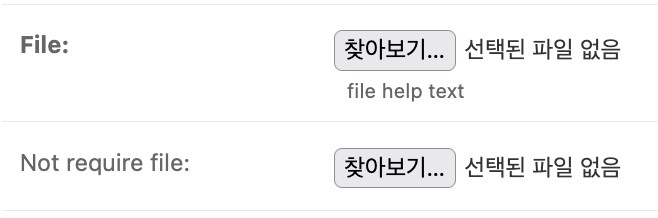
Currently, in the admin, labels for required fields are displayed in bold.

The fact that the label is displayed in bold allows sighted users to recognize that the field is required, but users who rely on screen readers and cannot see the visual styling are unable to perceive this.
When accessing a label, additional descriptive text should be provided, or an element indicating that the field is required should be placed to the right of the label with appropriate ARIA attributes, so that users of screen readers can recognize that the field is required.
Personally, I prefer indicating required fields using a red asterisk (*).
Attachments (1)
Change History (11)
by , 14 months ago
| Attachment: | Screenshot 2025-08-29 at 7.57.57 PM.png added |
|---|
comment:1 by , 14 months ago
| Owner: | set to |
|---|---|
| Status: | new → assigned |
comment:2 by , 14 months ago
| Type: | Uncategorized → Cleanup/optimization |
|---|
follow-up: 4 comment:3 by , 14 months ago
| Cc: | added |
|---|
comment:4 by , 14 months ago
Replying to Sarah Boyce:
When I test with a screen reader, the required input elements are announced as required. So there's no missed information here
Bold is not conveying meaning by a different color (which would not work for color blind users), so I actually think we might be for this one.
I will let the accessibility team make the final call here though
Sorry! I should have provided more information. For regular forms, this isn’t really an issue, but for inline forms, even though required fields are displayed in bold, the inline form itself is not marked as required. This means that even if a field inside the inline is required when creating an object, there is no indication of its required status (other than the visual bold style).
The reason I focused on regular forms in the ticket is because, personally, I think it would be better to have something other than bold text some element explicitly indicating that a field is required. That way, the information would be provided consistently to both screen reader users and sighted users.
I suppose we’ll need to discuss further how exactly this issue should be addressed.
comment:5 by , 14 months ago
| Summary: | Accessibility improvement for required field labels in the admin. → Accessibility improvement for required field labels for inline forms in the admin. |
|---|---|
| Triage Stage: | Unreviewed → Accepted |
Ok, inline forms need addressing. Potentially dynamically setting required when the new inlines are being filled but certainly setting required on the required fields of existing inline instances
comment:7 by , 11 months ago
| Patch needs improvement: | set |
|---|
comment:8 by , 10 months ago
| Triage Stage: | Accepted → Unreviewed |
|---|
I investigated why fields in admin inlines do not include the HTML required attribute.
It turns out that inline forms in the admin are generated using Django’s modelformset_factory. Forms created through formsets do not render the required attribute on required fields.
# django/forms/formsets.py

class BaseFormSet(RenderableFormMixin):
    ...
    def _construct_form(self, i, **kwargs):
        """Instantiate and return the i-th form instance in a formset."""
        defaults = {
            "auto_id": self.auto_id,
            "prefix": self.add_prefix(i),
            "error_class": self.error_class,
            # Don't render the HTML 'required' attribute as it may cause
            # incorrect validation for extra, optional, and deleted
            # forms in the formset.
            "use_required_attribute": False,
            "renderer": self.form_renderer,
        }
        ...
This behavior is also documented in the formset documentation.
So this doesn’t seem to be an issue specific to the admin, but rather a broader accessibility concern with formsets.
Since form fields in formsets don’t include the required attribute, screen reader users are unable to determine which fields are required in those forms.
Should we consider adding another accessibility attribute to indicate required fields for assistive technologies?
I’m reverting the ticket back to Unreviewed as it appears further triage is needed :)
follow-up: 10 comment:9 by , 10 months ago
| Triage Stage: | Unreviewed → Accepted |
|---|
Thanks for the analysis, Antoliny.
I think Sarah's triage in comment:5 is still right.
The undocumented empty_permitted parameter to FormSet—primarily used in the admin for inlines (see ticket:16328#comment:2) but clearly in use elsewhere (see #28171)—expresses a concept that cannot be statically expressed with the HTML5 required attribute, since the semantic is more like "usually required, but not in case all other fields are also empty".
Should we consider adding another accessibility attribute to indicate required fields for assistive technologies?
I think this would reduce to the same problem. "Required except sometimes not".
I think Sarah is envisioning a change listener to remove/restore the required attribute depending on whether any field in an inline is non-empty.
Depending on how this is implemented, we might have to revisit the exception added in #28171, since the following would no longer be invalid usage: you can manage it with javascript:
-
django/contrib/admin/options.py
diff --git a/django/contrib/admin/options.py b/django/contrib/admin/options.py
index 6c202c8e61..983716205c 100644
a b class ModelAdmin(BaseModelAdmin): 2294 2294 "instance": obj, 2295 2295 "prefix": prefix, 2296 2296 "queryset": inline.get_queryset(request), 2297 "form_kwargs": { "empty_permitted": True, "use_required_attribute": True }, 2297 2298 } 2298 2299 if request.method == "POST": 2299 2300 formset_params.update(
Some details to work out there.
comment:10 by , 10 months ago
Replying to Jacob Walls:
Thanks for the analysis, Antoliny.
I think Sarah's triage in comment:5 is still right.
The undocumented
empty_permittedparameter toFormSet—primarily used in the admin for inlines (see ticket:16328#comment:2) but clearly in use elsewhere (see #28171)—expresses a concept that cannot be statically expressed with the HTML5 required attribute, since the semantic is more like "usually required, but not in case all other fields are also empty".
Should we consider adding another accessibility attribute to indicate required fields for assistive technologies?
I think this would reduce to the same problem. "Required except sometimes not".
I think Sarah is envisioning a change listener to remove/restore the
requiredattribute depending on whether any field in an inline is non-empty.
Depending on how this is implemented, we might have to revisit the exception added in #28171, since the following would no longer be invalid usage: you can manage it with javascript:
django/contrib/admin/options.py
diff --git a/django/contrib/admin/options.py b/django/contrib/admin/options.py
index 6c202c8e61..983716205c 100644
a b class ModelAdmin(BaseModelAdmin): 2294 2294 "instance": obj, 2295 2295 "prefix": prefix, 2296 2296 "queryset": inline.get_queryset(request), 2297 "form_kwargs": { "empty_permitted": True, "use_required_attribute": True }, 2297 2298 } 2298 2299 if request.method == "POST": 2299 2300 formset_params.update( Some details to work out there.
Thank you, Jacob.
Your explanation was really helpful for me to understand this issue more clearly!
It makes sense that cases like Admin inlines need empty_permitted(True) and the use_required_attribute(True) attribute to coexist to some extent.
And, as you said, we would rely on JavaScript to resolve the conflict between these two behaviors.
As both of you mentioned, existing inline objects should keep their fields marked as required by default, while fields for new inline forms should dynamically add or remove the required attribute depending on whether any data has been entered.
I think I finally understand the approach Sarah is suggesting.
If I’m still misunderstanding something, please feel free to point it out — even if it’s a bit frustrating to explain again :)
When I test with a screen reader, the required input elements are announced as required. So there's no missed information here
Bold is not conveying meaning by a different color (which would not work for color blind users), so I actually think we might be for this one.
I will let the accessibility team make the final call here though