Opened 9 years ago
Last modified 9 years ago
#28716 closed Bug
search_fields = ['question_text'] from Tutorial07 not working. — at Version 1
| Reported by: | Patrick Kyne | Owned by: | nobody |
|---|---|---|---|
| Component: | Documentation | Version: | 1.11 |
| Severity: | Normal | Keywords: | search_fields documentation tutorial |
| Cc: | Triage Stage: | Unreviewed | |
| Has patch: | no | Needs documentation: | no |
| Needs tests: | no | Patch needs improvement: | no |
| Easy pickings: | no | UI/UX: | no |
Description (last modified by )
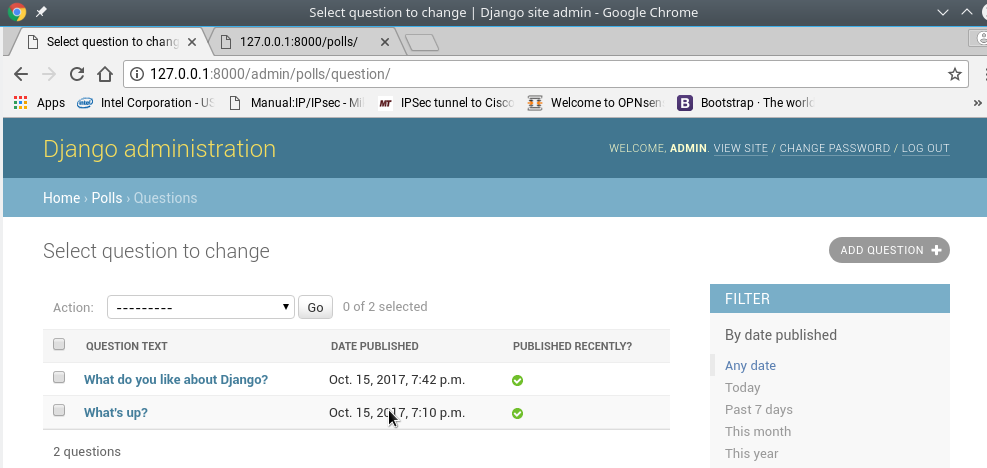
Following the django tutorial from the beginning, everything works as it should except the Search Fields example in Tutorial 07.
Following the tutorial, my polls/admin.py appears below. However, no search field appears in Google Chrome or in Firefox. No error is thrown by the django server either. I did not find any relevant google responses to the issue, nor did I find it here in Trac.
## polls/admin.py:
from django.contrib import admin

# Register your models here.

from .models import Question, Choice

class ChoiceInline(admin.TabularInline):
    model = Choice
    extra = 3


class QuestionAdmin(admin.ModelAdmin):
    fieldsets = [
        (None,               {'fields': ['question_text']}),
        ('Date information', {'fields': ['pub_date'], 'classes': ['collapse']}),
    ]
    inlines = [ChoiceInline]

    list_display = ('question_text', 'pub_date', 'was_published_recently')

    list_filter = ['pub_date']

    search_fields = ['question_text']

admin.site.register(Question, QuestionAdmin)
System check identified no issues (0 silenced).
October 16, 2017 - 15:36:08
Django version 1.11.5, using settings 'mysite.settings'
Starting development server at http://127.0.0.1:8000/
{140}$ python
Python 3.6.2 (default, Aug 03 2017, 16:34:42) [GCC] on linux
Change History (2)
by , 9 years ago
| Attachment: | Screenshot_20171016_172927.png added |
|---|

comment:1 by , 9 years ago
| Description: | modified (diff) |
|---|
I've tested it with both the search_fields as:
search_fields = ['question_text']
-and-
search_fields = ['question_text', 'pub_date']
to see if there were any difference or error thrown. No difference. No search field is displayed, and no error is thrown.
Chrome example