Using gedit with Django
gedit is a free, lightweight editing tool for the GNOME desktop found in many distributions of Linux, BSD and other Unix systems.
Feature List
- Full support for internationalized text (UTF-8)
- Configurable syntax highlighting for various languages (C, C++, Java, HTML, XML, Python, Perl and many others)
- Undo/Redo
- Editing files from remote locations
- File reverting
- Print and print preview support
- Clipboard support (cut/copy/paste)
- Search and replace
- Go to specific line
- Auto indentation
- Text wrapping
- Line numbers
- Right margin
- Current line highlighting
- Bracket matching
- Backup files
- Configurable fonts and colors
- A complete online user manual
Some screenshots of gedit:
http://www.gnome.org/projects/gedit/screenshots.html
There are useful plugins like a python console or snippets and of course you can write your own plugins in python.
http://live.gnome.org/Gedit/Plugins/BetterPythonConsole
Plugins
A list of plugins that you may find helpful in gedit:
- Auto Tab
- Bookmarks
- Draw Spaces
- Embedded Terminal
- File Browser Pane
- FTP Browser
- Line Tools
- Modelines
- Python Console
- Save without trailing space
- Session Saver
- Smart Spaces
- Snippets (& django snippets for gedit)
- Symbol Browser
- Tag list
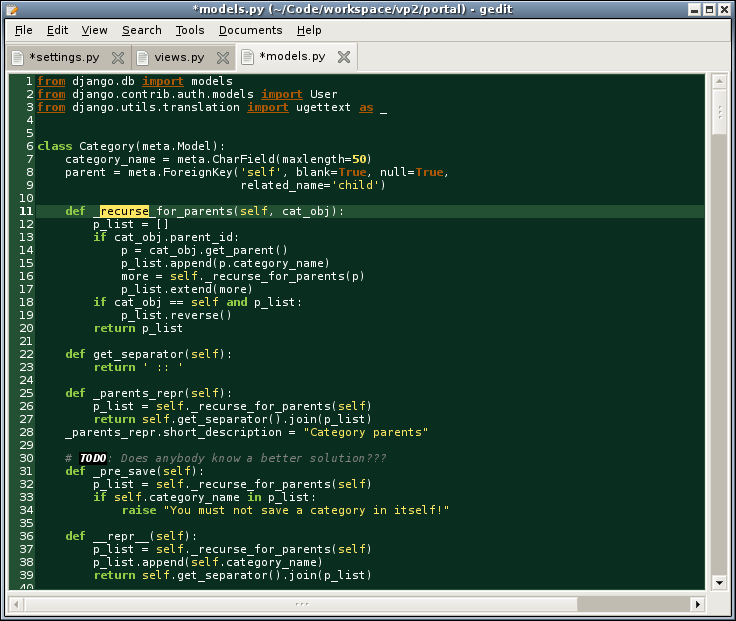
django theme for gedit
I created a theme based on the color scheme used on the Django website.
To install the scheme, download django1.xml and copy the django1.xml to /usr/share/gtksourceview-2.0/styles/
sudo cp django1.xml /usr/share/gtksourceview-2.0/styles/
and activate it in gedit > Edit > Preferences > Fonts & Colors.

Last modified
16 years ago
Last modified on Jul 29, 2010, 5:35:48 PM
Attachments (4)
-
gedit-django-scheme.png
(77.5 KB
) - added by 18 years ago.
screenshot of gedit and django scheme
-
django.xml
(3.7 KB
) - added by 18 years ago.
django.xml scheme file for gedit
-
django1.xml
(3.8 KB
) - added by 17 years ago.
django.xml scheme file for gedit with draw-spaces update
-
django2.xml
(3.8 KB
) - added by 14 years ago.
Bracket Matching decreased color to avoid confusion with the cursor
Download all attachments as: .zip
Note:
See TracWiki
for help on using the wiki.