#9858 closed (fixed)
Add POSTGIS_TEMPLATE setting for GIS Test Runner
| Reported by: | Owned by: | jbronn | |
|---|---|---|---|
| Component: | GIS | Version: | 1.0 |
| Severity: | Keywords: | test template_postgis create_spatial_db | |
| Cc: | vim@…, stryderjzw@… | Triage Stage: | Accepted |
| Has patch: | yes | Needs documentation: | no |
| Needs tests: | no | Patch needs improvement: | no |
| Easy pickings: | no | UI/UX: | no |
Description
After setting up geodjango with PostgreSQL 8.3, PostGIS 1.3.3, and the win32 geodjango installer, an attempt to run the gis tests fails.
I am using the django 1.0.2 release (and geodjango code included therewith) under Python 2.5 on Win XP Pro
The source of the error seems to be that the addgeometrycolumn procedure does not exist in the test database.
from settings.py:
TEST_RUNNER         = 'django.contrib.gis.tests.run_gis_tests'
POSTGIS_SQL_PATH    = 'D:/generic/PostgreSQL/8.3/share/contrib'
from test output:
Installing custom SQL for geoapp.Country model
Failed to install custom SQL for geoapp.Country model: function addgeometrycolumn(unknown, unknown, integer, unknown, integer) does not exist
LINE 1: SELECT AddGeometryColumn('geoapp_country', 'mpoly', 4326, 'M...
               ^
HINT:  No function matches the given name and argument types. You might need to add explicit type casts.
complete log file attached.
The geodjango docs state that a spacial database is created using the template template_postgis. In tracing the error noted above, I discovered that the test database is created with no template. This seems to account for the missing procedure.
I patched source:django/tags/releases/1.0.2/django/contrib/gis/db/backend/postgis/creation.py with a modified _create_with_cursor, called by create_spatial_db, using a new setting to specify the template name. It seems to me that get_cmd_options should similarly be modified.
The tests are successful with my patch applied (log file attached)
I'm perplexed to find no mention of this anywhere. Is there something I'm missing? Does the gis test work for everyone else without using the template?
Attachments (4)

Change History (12)
by , 18 years ago
| Attachment: | failed_test.log added |
|---|
by , 18 years ago
| Attachment: | successful_test.log added |
|---|
by , 18 years ago
| Attachment: | creation_patch_for_gis_test added |
|---|
comment:1 by , 18 years ago
| Owner: | changed from to |
|---|---|
| Triage Stage: | Unreviewed → Accepted |
comment:2 by , 18 years ago
| Cc: | added |
|---|
comment:3 by , 18 years ago
| milestone: | → post-1.0 |
|---|---|
| Status: | new → assigned |
| Summary: | pg test database not created with postgis template, tests fail → Add POSTGIS_TEMPLATE setting for GIS Test Runner |
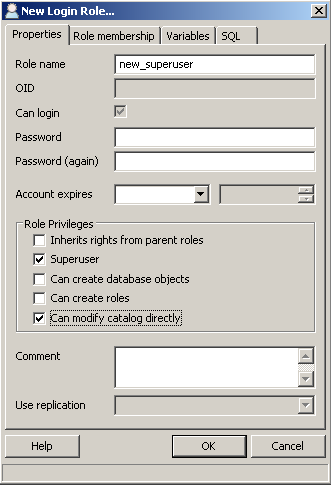
Alright, I think I've figured this one out. On Windows you have specify an extra permission for the database superuser to be able to import the PostGIS files this is "Can modify data objects." Attached is a screen shot from PGAdmin III that shows this permission checked in the create new role gui.
Regardless, I'm not gonna "wontfix" this, and I'm repurposing the ticket to add support for a POSTGIS_TEMPLATE setting.
by , 18 years ago
| Attachment: | pgadmin_modify_catalog.png added |
|---|
comment:4 by , 18 years ago
Just FYI I ran into the "Can modify catalog directly" on a Ubuntu 8.04 machine, postgres 8.3, so it might not just be a windows thing.
comment:5 by , 18 years ago
| Resolution: | → fixed |
|---|---|
| Status: | assigned → closed |
comment:7 by , 17 years ago
| milestone: | → 1.1 |
|---|
I ran into the problem as well this weekend when I tested the updated GeoDjango installer (with 1.0.2) on Windows -- so it's a confirmed new issue (thanks for creating a ticket). I came up with a similar patch that just assumed the existence of a PostGIS template -- but I like the idea of the
POSTGIS_TEMPLATEsetting more, and it could reduce some of that crufty spatial db creation code from the PostGIS spatial backend.I'm still wondering, however, why it ceased to work as it used to in my previous Windows VM.